Buying and selling start numbers
Registration for most events is binding. Some organizers still allow you to cancel your registration within a given date, or that you can sell your start number to someone else. Information about this can be found on the event's website or Facebook page. You can also find out if this is possible on My Pages under the Registrations tab for the race in question.
Places for sale can be found on our sales platform.
Instructions for sellers
You can prepare your start number for sale via EQ.me.
NB! This function is not available until the invoice for the race has been posted as paid with us.
When the invoice has been registered as paid, the button "activate code to sell place" will be available. If there are only a few days until the race, you must pay your registration via My Pages under the Invoice tab with card or Vipps. Your payment will then be booked as paid immediately and you can get a Transfer Code.
Here's how to do it:
Log in to EQ.Me
Go to the Registrations tab.
Click on the registration you want to sell
Click on Activate code to sell space
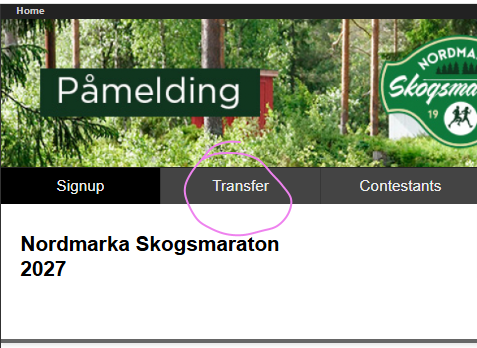
A Transfer Code will then be generated and displayed on the screen. You should give this Transfer Code to the person who buys your space. The buyer should register via the regular registration link for the event - but select the tab Transfer and not Signup. The seller's registration will be automatically deleted when a new participant is registered.
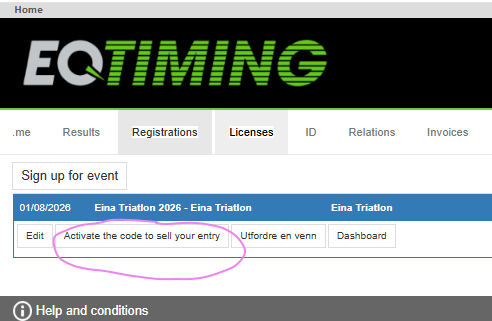
You can also choose and post your registration on the "sales market" of EQ Timing, you select this option in the same operation as activating the code.
If the seller wants to deactivate the transfer code, you can click on Deactivate code to sell space.
NB! Financial settlement is handled directly between the buyer and seller.
The organizer has usually set a price for registration with Buy/take over place. The invoice for this is sent to the new participant.
As a buyer, you are registered exactly the same as the seller was in terms of license, distance and pool. The age group is given based on the new participant's year of birth.
If the buyer makes changes or additional purchases during registration, such as transportation, accommodation, one-time license or other, the buyer will receive an invoice for this.
If the buyer wants to change the distance after the registration has been confirmed, this can be done for most races in My pages under Registrations. Click on the race and you will see a change button.
Instructions for the buyer
Receive Transfer code from the seller.
Go to the event's ordinary registration link.
Select Transfer
Enter the Transfer code you received from the seller.
Click on the shopping cart to continue.
Log in with your EQ.me account – or create a new account if you don't already have one.
Fill out the form to complete your registration.